> For the complete documentation index, see [llms.txt](https://docs.varbase.vardot.com/llms.txt). Markdown versions of documentation pages are available by appending `.md` to page URLs; this page is available as [Markdown](https://docs.varbase.vardot.com/developers/understanding-varbase/varbase-ai-modules/ai-media/svg-and-animated-svg.md).

# SVG and Animated SVG

The **SVG** generator writes a vector graphic with the chat model. It is static by default; with the **Style** option it can also be animated, and the **Animated SVG** component and the **Inline SVG (animated)** display make it move on the page.

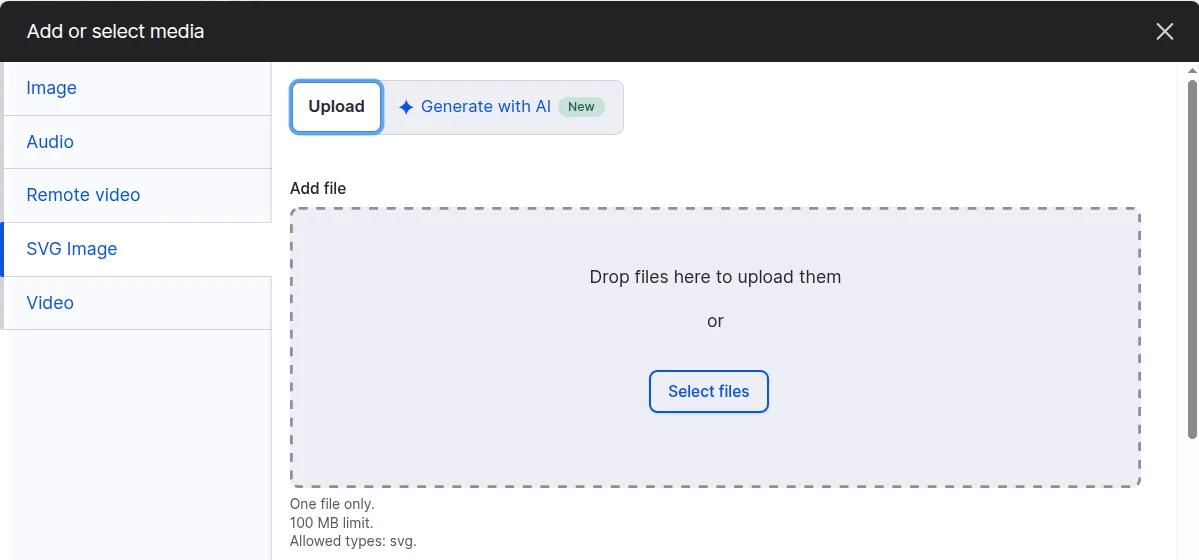
<figure><img src="https://410909369-files.gitbook.io/~/files/v0/b/gitbook-x-prod.appspot.com/o/spaces%2FzBcuWLZ87gvtX5vA2YGD%2Fuploads%2Fgit-blob-807daf72990071f2b10d1739012386126a265f8e%2FVarbase%20AI%20Media%20Base%20-%20SVG%20Image%20Tab%20Switch.webp?alt=media" alt="The SVG Image tab of the Add or select media dialog, with the Upload and Generate with AI switch at the top and an upload area that allows SVG files"><figcaption><p>The Upload or Generate With AI Switch in the SVG Image Tab</p></figcaption></figure>

## Styles

| Style                      | What the Model Writes                                                     | What Moves It                                                   |
| -------------------------- | ------------------------------------------------------------------------- | --------------------------------------------------------------- |
| Static                     | A drawing, no animation                                                   | Nothing                                                         |
| Animated: draw the strokes | Stroke-only parts (`<g class="ai-media-part">`), no animation in the file | The component draws each stroke by its own length, part by part |
| Animated: CSS keyframes    | A `<style>` with `@keyframes` inside the file                             | The component starts it when it scrolls into view               |
| Animated: SMIL             | `<animate>`, `<animateTransform>`, `<set>`                                | The component starts it when it scrolls into view               |

<figure><img src="https://410909369-files.gitbook.io/~/files/v0/b/gitbook-x-prod.appspot.com/o/spaces%2FzBcuWLZ87gvtX5vA2YGD%2Fuploads%2Fgit-blob-7b20b158449aa0e1bfe3bd7f7cc3b7846cf5aacb%2FVarbase%20AI%20Media%20Base%20-%20SVG%20Styles.webp?alt=media" alt="Four generated SVGs side by side, one per style: a static paper plane, a rocket and skyline drawn as strokes, a gear and light bulb with CSS keyframes, and a circle with a moving dot using SMIL"><figcaption><p>The Four SVG Styles</p></figcaption></figure>

Editors see **Style** under **Options** only when **Editor options** \ **SVG** \ ***Show the style*** is on. Hidden by default, with **Static** as the default style (`editor_options.svg.style`: `show`, `default`).

Each animated style adds its own AI Prompt to the SVG drawing prompt, in the AI module's prompt library (prompt type `ai_media_svg_motion`):

| Use              | Setting            | Default Prompt              |
| ---------------- | ------------------ | --------------------------- |
| Draw the strokes | `prompts.svg_draw` | `ai_media_svg_motion__draw` |
| CSS keyframes    | `prompts.svg_css`  | `ai_media_svg_motion__css`  |
| SMIL             | `prompts.svg_smil` | `ai_media_svg_motion__smil` |

## Showing It So It Moves

An SVG in an `<img>` gets no page CSS or script, so motion that starts on scroll cannot run there. Two ways print it inline instead:

* **Animated SVG** (`ai_media:animated-svg`), a Single Directory Component that **Drupal Canvas** can place. Props: `svg`, `label` (empty means decorative), `animation` (`auto`, `draw`, `rise`, `play`, `none`), `stagger`, `duration`, `replay`. It has no AI dependency: hand-written SVG works too.
* **Inline SVG (animated)**, a display (field formatter) for image and file fields. Use it on the SVG media type's source field, and a generated SVG animates wherever the media item is shown. Files that are not SVG render as images.

`auto` draws a "draw the strokes" SVG, plays an SVG that carries its own animation, and shows any other SVG still. The motion starts when the drawing scrolls into view; with **prefers-reduced-motion** the finished drawing is shown at once, SMIL included. Without JavaScript, and in print, the drawing is shown as it is. The review step after **Generate** uses the same component, so the preview moves as the page will.

## Safety

Inline SVG shares the page, so it is checked harder than a file. Every SVG goes through `SvgSanitizer`, on top of [enshrined/svg-sanitize](https://github.com/darylldoyle/svg-sanitizer):

* No `<script>`, `<foreignObject>`, `<image>`, `<iframe>`; a link is unwrapped and its drawing kept.
* No event handlers, no `href` other than `#id`, no `javascript:` or `data:` value, no `url()` outside the file.
* In `<style>` and `style=""`: no `@import`, no `javascript:` (escaped or not), no `expression()`.
* Animation keeps what it needs: `<style>` with `@keyframes`, `<animate>`, `<animateTransform>`, `<animateMotion>`, `<set>`. The library drops `<animate>` and `<set>`, because either can rewrite a link; they are allowed back only when `attributeName` is not a link, a handler, a style, a class or an id.

## Before an Answer Is Kept

* It must draw: at least 3 drawable elements, and every path `d` a complete command sequence (a moveto with a point, then another command).
* A `transform` attribute on an element that CSS animates is moved onto a new wrapper `<g>`, because a CSS transform replaces the attribute.
* A refused answer is asked for again, saying why, up to 3 tries, and only while the time spent is under the AI module's request timeout.
* A provider error ends the press. A timeout says so: "The AI service (provider, model) did not answer within N seconds." No timeout of **AI Media**'s own is added; the AI module's **Request timeout** applies to each call. A provider that needs longer per call takes the AI module's `http_client_options` (`timeout`) provider configuration.

## SVG Media That Can Be Selected

Core's media `thumbnail` base field refuses `svg`, so an SVG media item saves but no field or media embed can select it. While the **SVG** generator is on, **AI Media** adds `svg` to that field. Core also renders nothing for an SVG through an image style (no toolkit can resize it); **AI Media** shows the original file instead, so the **Media Library** grid shows the drawing.

## Example Recipe

`recipes/ai_media_svg_example` shows it working right after install:

```bash
drush recipe modules/contrib/ai_media/recipes/ai_media_svg_example
```

It adds an "SVG Image" media type (or keeps the site's own `svg_image`), saves generated SVGs into it, shows it with **Inline SVG (animated)**, adds an **Animated SVG** field on Basic page, adds the type to text formats whose media embed lists its types, shows the **Style** option, and creates an "Animated SVG example" page with a process flow that draws and a bar chart that plays its own keyframes. It is inside the module, like core's own `core/recipes`, so it ships with the module and needs no separate package. Generic example SVGs are in `tests/fixtures/svg`.

For media embeds in recipes, **AI Media** adds the `allowMediaEmbedTypes` config action: it adds types to a format's embed list and leaves alone a format that allows every type or has no embed filter.

```yaml
filter.format.full_html:
  allowMediaEmbedTypes: [image, svg_image]
```

{% hint style="info" %}
There is no CKEditor "Generate SVG" button. The AI module's CKEditor tools return text into the editor; CKEditor 5 has no model for SVG, so it strips or breaks inline `<svg>`, and a text format would need a filter that prints sanitized SVG. Generate the SVG as media instead and embed it; it renders through the media's display.
{% endhint %}

## When an SVG Does Not Show

| What                                                                 | Symptom                                                              | Where It Is Fixed                                                          |
| -------------------------------------------------------------------- | -------------------------------------------------------------------- | -------------------------------------------------------------------------- |
| Media `thumbnail` refuses `.svg`                                     | The item saves and lists, but cannot be selected                     | **AI Media**, for the SVG generator's media type while the generator is on |
| An image style cannot resize SVG                                     | An empty box in the **Media Library** grid or an image style display | **AI Media**, while the SVG generator is on and has a media type           |
| The media field does not allow the SVG type                          | No **SVG Image** tab in that field's **Media Library**               | Site config: the field's **Media types**                                   |
| The text format's **Embed media** lists types without the SVG type   | No **SVG Image** tab behind CKEditor's **Insert Media**              | Site config, or `allowMediaEmbedTypes` in a recipe                         |
| The theme's image template drops the `<img>`                         | An empty `<figure>` where the image should be                        | The theme                                                                  |
| **Limit allowed HTML** runs after **Embed media** and has no `<img>` | Every embedded image, SVG or not, is removed                         | Site config: order the filters, or allow `<img>`                           |