
Updating from Varbase 8.x to 9.x
Read First Before Updating
Updating a Varbase SiteUnderstanding Varbase Updater PackageCheck the Upgrading a Drupal 8 site to Drupal 9
Check the How and why we deprecated code on the way to Drupal 9
Check the What changes are there for third-party dependencies?
1. Change Composer Version Before Updating
Varbase 8.8.7 and Older
Make sure that Composer version ~1 is in use in the development environment.
sudo composer self-update --1Later in the steps of upgrade, when the Varbase version reaches 8.8.8 or newer.
Be sure to switch the composer.json file to work with Composer ~2
Remove the not Needed Drupal Library Installer Plugin
Remove "drupal/drupal-library-installer-plugin": "^0.3", from the composer.json file.
Varbase 8.8.8 and Newer
Make sure that Composer version ~2 is in use in the development environment.
2. Add Drush
3. Uninstall All Removed Components
A number of modules, themes, and libraries was removed from Varbase 9. That for Drupal 9 compatibility, or for change of selection to use better tools, and newer and better UI/UX themes.
Check that all used modules in the project are Drupal 9 Compatible!
Modules Had Been Removed
Uninstall the Libraries API Module
drush pm:uninstall libraries
Drupal 9 Compatible but no longer in Varbase Core
Issue #3170653: Removed Libraries API module as much of its functionality had been moved to Drupal 9 core
Uninstall the Libraries UI Module
drush pm:uninstall libraries_ui
Not Compatible with Drupal 9 yet
Issue #3168664: Removed Libraries UI module from Varbase Development
Uninstall the Mail Editor Module
drush pm:uninstall mail_edit
Not Compatible with Drupal 9 yet
Issue #3168674: Removed Mail Editor module from Varbase Core
Uninstall the Webform Analysis Module
drush pm:uninstall webform_analysis
Not Compatible with Drupal 9 yet
Issue #3175839: Removed Webform Analysis module from Varbase Core
Uninstall the Tour Builder Module
drush pm:uninstall tour_builder
Not Compatible with Drupal 9 yet
Issue #3176580: Removed Tour Builder module from Varbase Core
Uninstall the SMTP Authentication Support Module.
drush pm:uninstall smtp
Drupal 9 Compatible but no longer in Varbase Mail
Uninstall the Media Library Theme Reset Module
drush pm:uninstall media_library_theme_reset
Not Compatible with Drupal 9 yet
Issue #3174423: Removed Media Library Theme Reset module
Uninstall the Color Field Module.
drush pm:uninstall color_field
Drupal 9 Compatible but no longer in Varbase Core
Issue #3145737: Removed Color Field module
Uninstall the Adminimal Admin Toolbar Module
drush pm:uninstall adminimal_admin_toolbar
Drupal 9 Compatible but no longer in Varbase Core
Varbase switched to use Vartheme Claro and Claro from Drupal Core.
Keeping Admininimal? Add the following to the composer.json file In case of choosing to keep the Adminimal - Responsive Administration Theme as the default back-end theme.
"drupal/vartheme_admin" : "~6.0"
"drupal/adminimal_admin_toolbar": "~1.0"
Make sure to clear cache and all functional behaviors are working well
drush cr
Themes Had Been Removed
Uninstall the Vartheme Admin Theme and the Adminimal - Responsive Administration Theme
Drupal 9 Compatible but no longer used by Varbase
Issue #3145720: Removed Vartheme Admin theme
drush theme:enable vartheme_claro
drush config:set system.theme admin vartheme_claro
drush theme:uninstall vartheme_admin
drush theme:uninstall adminimal_theme
Keeping Admininimal? Add the following to the composer.json file In case of choosing to keep the Adminimal - Responsive Administration Theme as the default back-end theme.
"drupal/vartheme_admin" : "~6.0"
In case of not uninstalling them and starting the update, the following issue will show up in the database update process.
[1] https://www.drupal.org/docs/8/update/troubleshooting-database-updates ) [error] (Currently using Missing or invalid themes The following themes are marked as installed in the core.extension configuration, but they are missing:
adminimal_themevartheme_admin
Make sure to clear the cache and all functional behaviors are working well
drush cr
4. Check All Required Contrib Modules in the Project
Check the Drupal 9 Compatibility for all used module.
Search for the "Drupal 9 is here!" notice in the Drupal project page for each required module in the root composer.json file for the project. Look for "Requires Drupal:" In the project page for the module in Drupal.org.
Example Module: Webform Mautic
Projects may or may not use this module. If it was required and used, check the following in the project page.
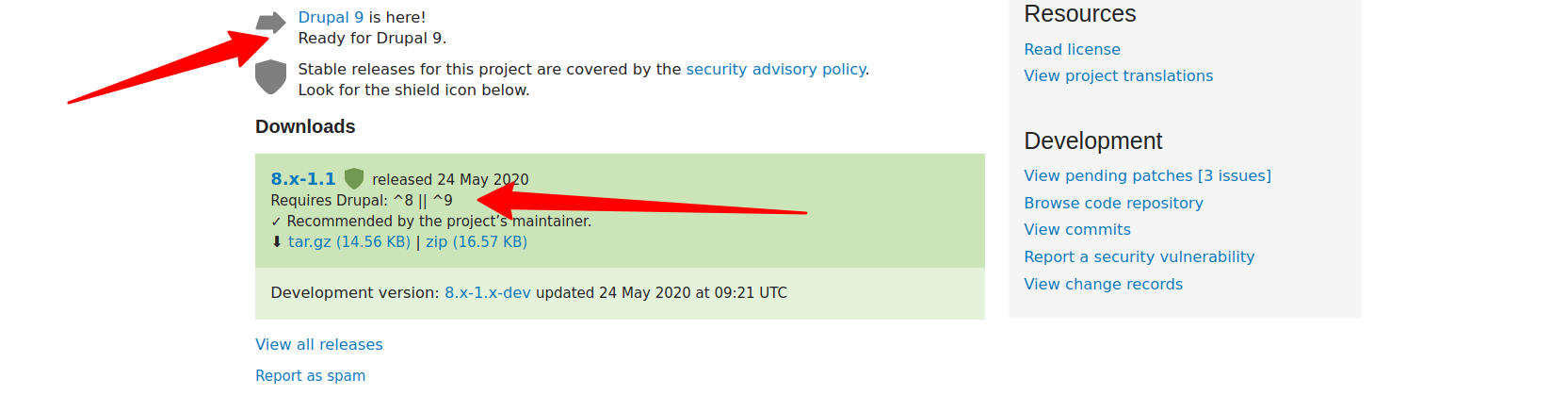
In case the module was not compatible with Drupal 9 yet, Follow with issues and the maintainer to make the module have a Drupal 9 Compatibility.
5. Check All Custom Modules in the Project
Check deprecation on all custom in-house modules.
6. Check All Required Libraries
Make sure that any used library has no conflict with any Drupal 9 core asset libraries.
7. Run the Update Varbase Command
Facing issues? Do the steps to do after the commands. next step.
8. Steps to Do After the Command
Do not abort the update process.
Type no then press the enter key.
In order not to abort and restore backups. To keep all work up to that point.
For sure the update will face errors while switching from Symfony 3 to Symfony 4
On the step of updating from Drupal ~8 to Drupal ~9, a number of duplicate key "services" detected in YamlSymfony.php and Parser.php.
Drupal 8 is using Symfony 3 and Drupal 9 is using Symfony 4
What changes are there for third-party dependencies?
Make sure to have the following in the composer.json file.
And the following in the extra, as having patches is a critical to have the right logic and complete working site.
Enable patching and composer should exit on patch failure. Not to miss any functionality or fixes after the update.
The root composer.json file should look like the Varbase 9.0.x project template composer.json file at the following link. Plus all added modules, themes, libraries, and needed patches for the project.
It should look like the composer.json file .. not the same exact copy of it
https://github.com/Vardot/varbase-project/blob/9.0.10/composer.json
keep the work of the automated updater. Do not do any manual copy and replacing for the outcome composer.json file. Only edit the the same file.
It is better to remove the composer.lock and vendor/ folder. Then do a composer install
Run Database update number of times. Until no updates are needed.
9. Remove Drush Before Deployment to Production
Remember to remove Drush from the composer before deploying to the live site.
10. Set Composer Exit on Patch Failure to True
Please, DO NOT set the following in the composer.json for projects
It should be
On wanting to ignore any patch, please use patches-ignore
Have a look at Ignoring Patches a link for how to do this in the right way
Extending VarbaseIf it was changed in any way or the Varbase Updater had it changed. Please change it back to
It was sat true in the Vardot/varbase-project/composer.json for the following rezone.
A module could have a security patch or a functional feature patch. If the patch did not apply. That means the project has a security issue, some expected behaviors will be lost or a bug will show up in the project.
If Varbase Layout Builder ~8.0 or ~9.0 were not Enabled in Old Sites
Only remove it from the root composer.json file for the project and do a
composer updateThe Varbase Layout Builder ~10.0 and all needed modules will be required in the default Varbase ~9.0 profile
Enable Varbase Layout Builder and Varbase Landing (Layout Builder) modules.